YouTube sources
YouTube sources give agents the transcribed content of public YouTube videos — product demos, lectures, training material. Flametree transcribes each video and indexes the transcript.
Add a video or channel
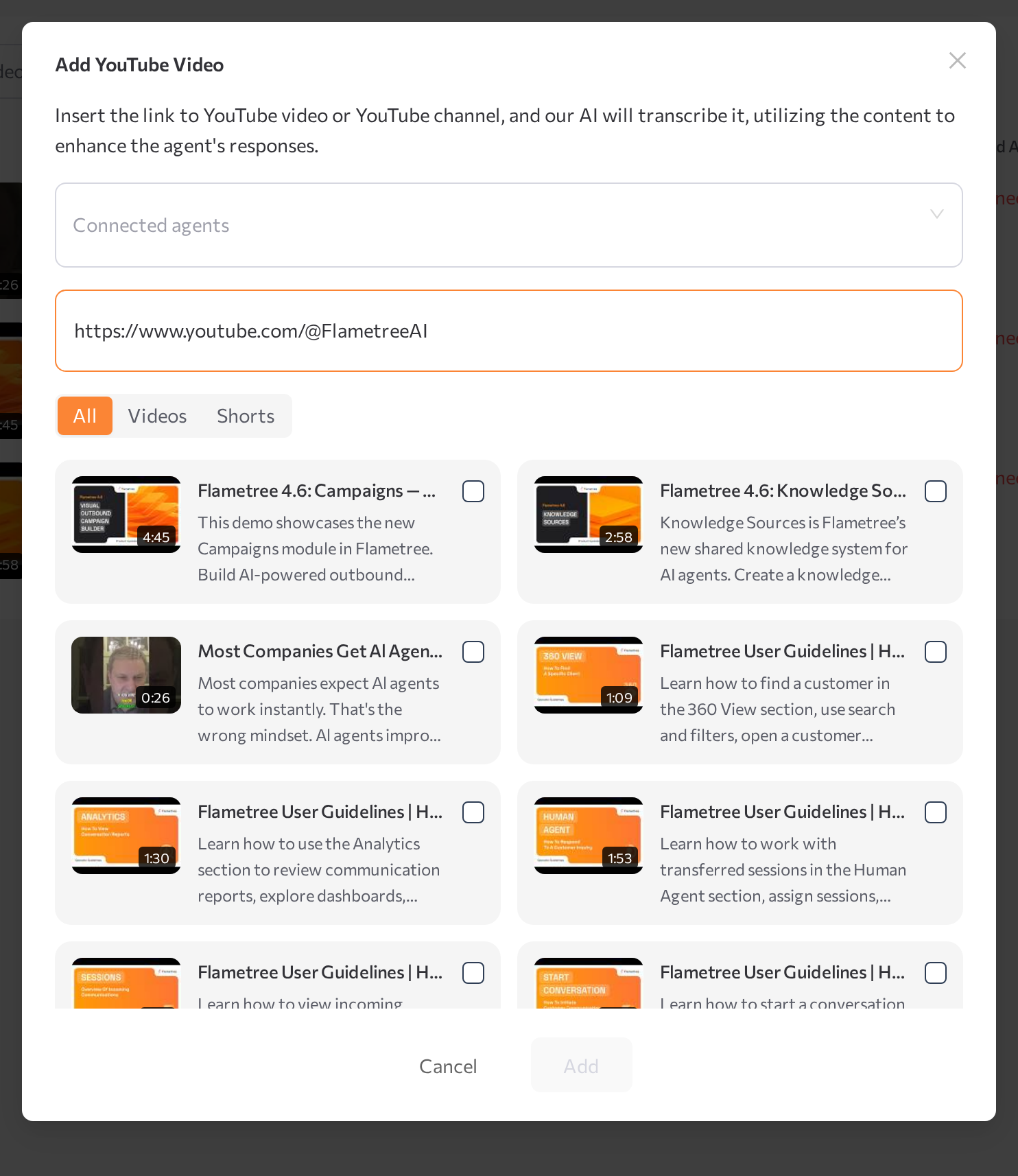
- Open the YouTube tab and click Add new video.
- In the Add YouTube Video window, optionally select Connected agents.
- Paste a link to a YouTube video or channel into Paste your link.
- A channel link lists the channel's videos. Filter the list with All, Videos, or Shorts and pick the videos to add.
- Each video must be public and within the duration limit. The dialog rejects videos over 3 hours (This video exceeds the 3-hour limit and cannot be added.); your deployment may enforce a stricter limit during indexing — if a long video ends in Error, use a shorter one.
- Click Add.
The videos appear in the YouTube table with their Video name, Video Type, Status, Usage Count, Connected Agents, and Added date.
Review and refresh transcripts
The row's View action opens a preview with the embedded video, its description, and an expandable Transcript section — read it to see exactly what the agent knows. The Edit Video window changes the title or connected agents, and Index re-fetches the transcript, for example after an Error.