Release Notes
Welcome to the Flametree release notes! Here you’ll find detailed information about new features, improvements, and updates in each version of our AI platform.
Flametree 5.0
September 8, 2026
Flametree 5.0 introduces two major updates:
-
Managing Flametree with coding AI agents (Claude Code, Codex, and others)
You can now create, modify, and manage AI agents, campaigns, and other Flametree platform resources through coding AI agents such as Claude Code and Codex, using the Flametree MCP plugin.
-
New interface for building and debugging complex AI agents
-
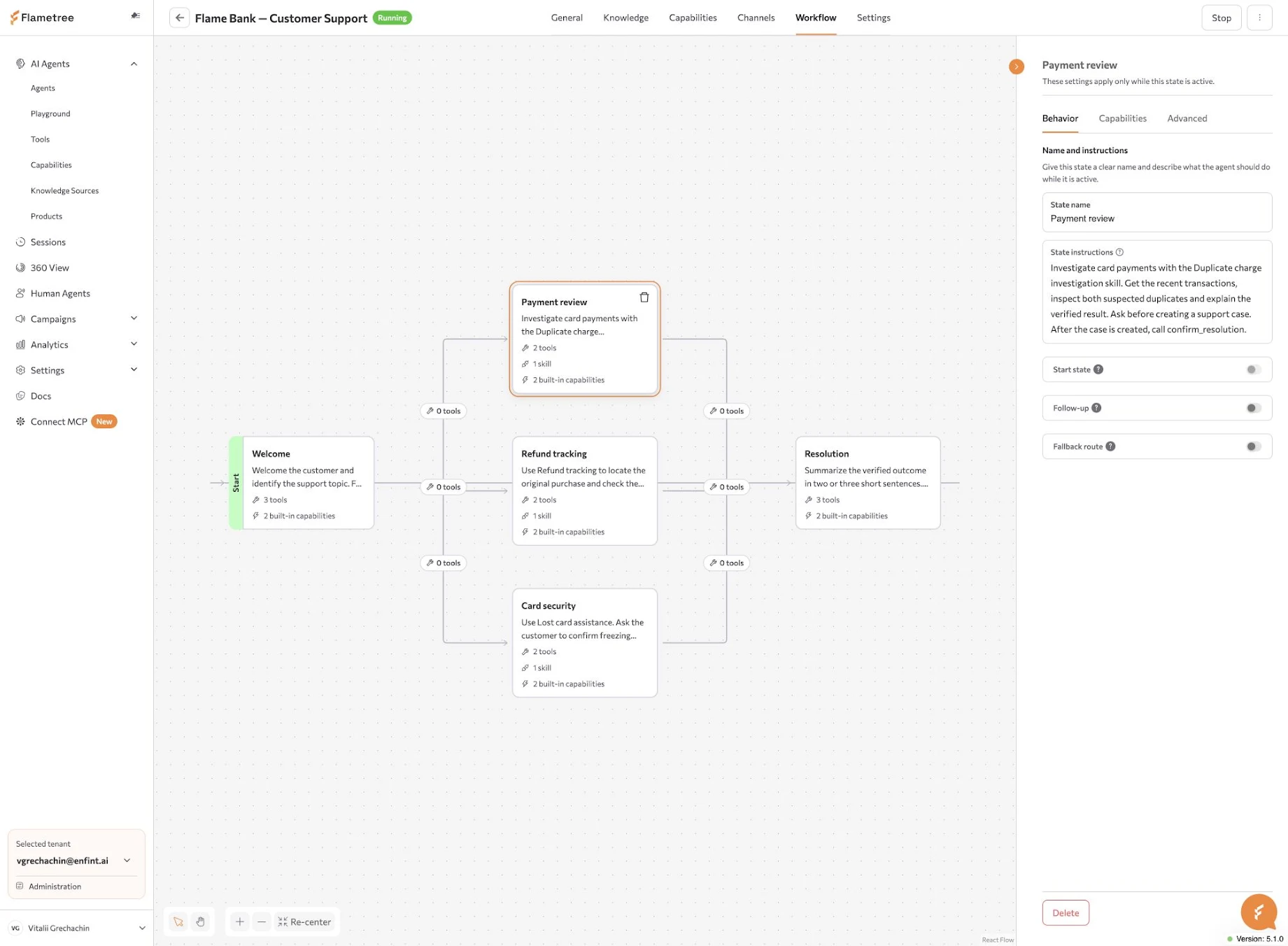
A new visual business process editor replaces YAML-based workflow configuration.
-
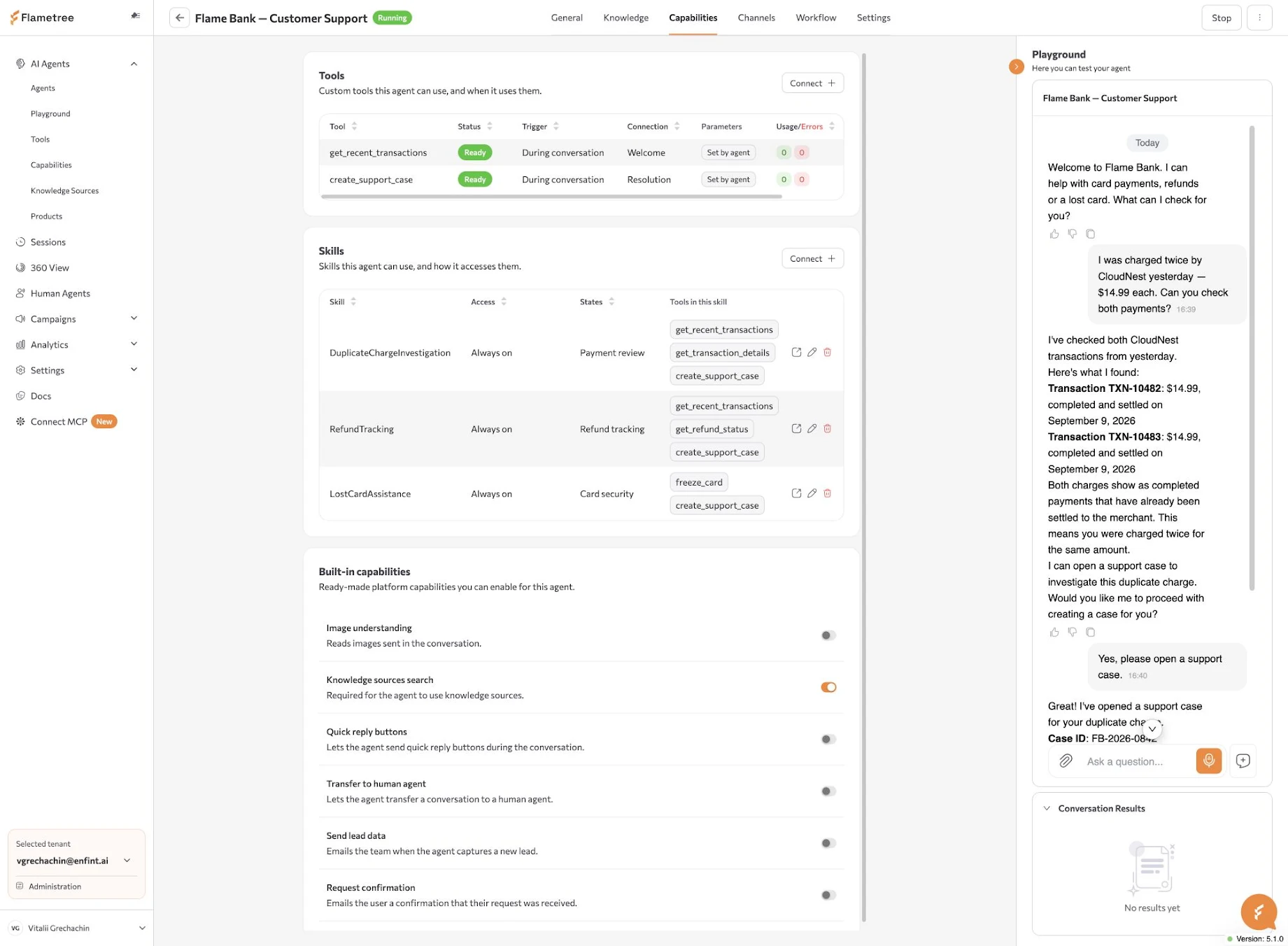
Tools can now be created, tested, and debugged directly within Flametree.
-
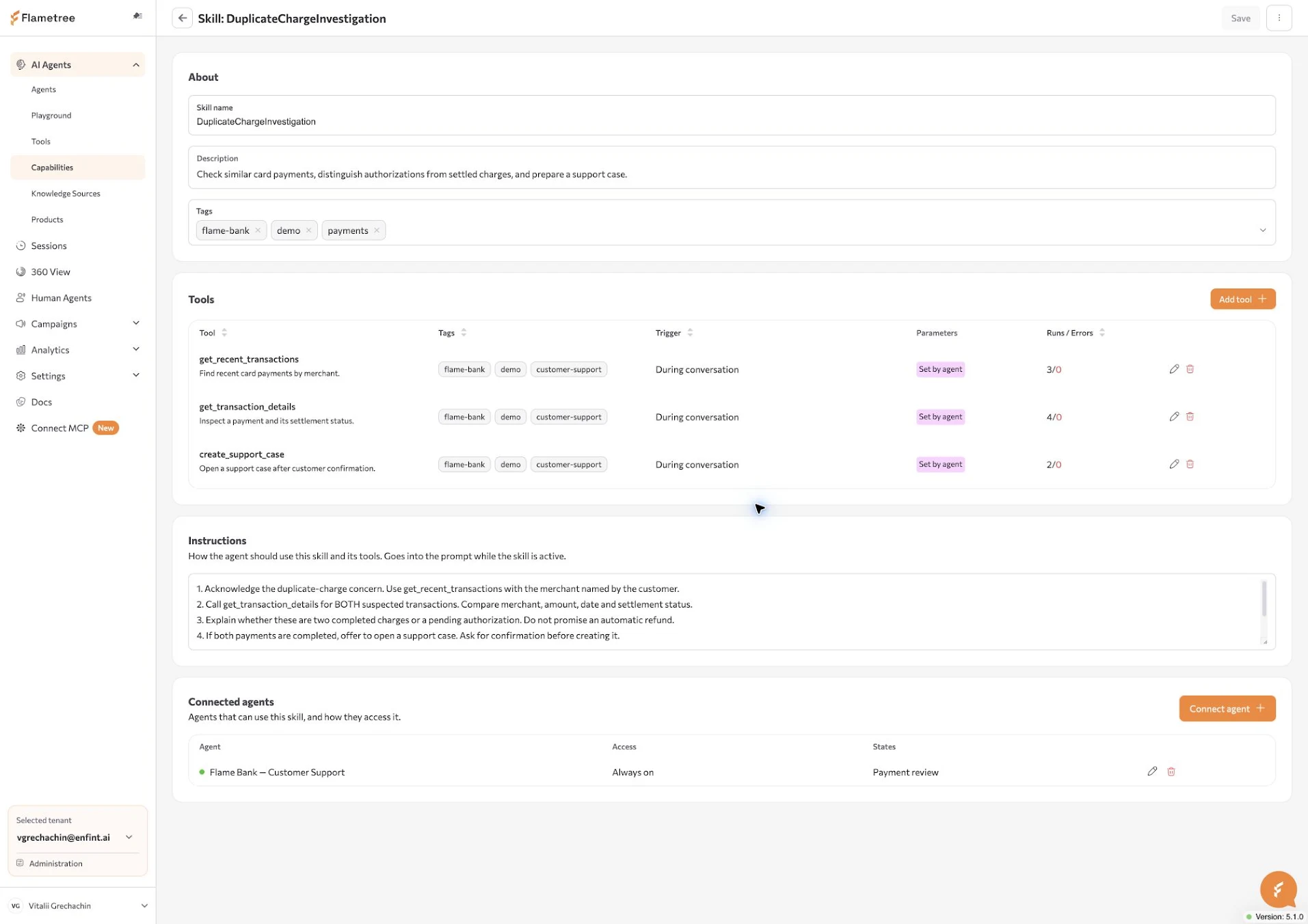
A new Skills interface makes it easier to define the instructions and tools AI agents use to perform complex, multi-step business operations.
-
🔌 Managing Flametree with coding AI agents
The Flametree MCP plugin connects your coding AI agent to Flametree through MCP (Model Context Protocol), so you can manage platform resources with natural-language instructions.
What’s new:
- Describe your requirements to create and configure AI agents, workflows, tools, and skills, or to manage campaigns and other platform resources.
- Use the Flametree interface to review what was created, edit settings, test behavior, and monitor execution.
- Creating and configuring AI agents entirely through the interface remains available.
Getting started: Follow the setup guide to connect your coding AI agent to Flametree through MCP using the MCP plugin.
🛠️ New interface for building and debugging complex AI agents
The redesigned interface brings together AI agent configuration, visual workflow editing, tool development, and skill management.
🧪 Redesigned AI agent workspace
What’s new:
- Manage AI agent instructions, knowledge, capabilities, channels, workflows, and settings in a redesigned workspace.
- Test conversations in the built-in Playground panel while reviewing and editing the AI agent.
- See header badges for Unsaved changes and Restart required, so you know when edits still need saving or applying.
🔀 Visual business process editor
What’s new:
- Build and edit AI agent workflows visually, with states and transitions displayed on an interactive canvas. The visual business process editor replaces YAML-based workflow configuration.
- Define instructions for each state and configure the conditions for moving between states.
- Connect tools and skills to the relevant states to control where and when the AI agent uses them.
🛠️ Create, test, and debug tools
What’s new:
- Upload Python files or paste code into the module editor, then select which functions to expose as AI agent tools.
- Configure tool descriptions and parameters, connect tools to AI agents, and reuse them across multiple AI agents.
- Test tools directly within Flametree and inspect execution logs, including duration, status, and error details.
- Copy logs into your coding AI agent to help diagnose and fix issues using the MCP plugin.
🧩 Skills for multi-step operations
What’s new:
- Combine instructions and tools into reusable skills that guide AI agents through multi-step business operations.
- Manage skills through a dedicated interface and reuse them across AI agents.
- Configure which skills are available at each state of an AI agent’s workflow.
- Choose how an AI agent reaches a skill: Always on, By name, or By search.
Flametree 4.7
July 31, 2026
Flametree 4.7 introduces several major improvements. You can now build AI agents with more powerful automation capabilities, easily set up META communication channels (WhatsApp, Facebook, and Instagram) directly from Flametree platform. We've also significantly improved functionality and usability of the Sessions workspace and redesigned account and access management interface.
💬 Proactive follow-up messages
What’s new:
- AI agents can now proactively follow up when a user goes quiet and silence is too long instead of waiting for the next user message.
- It can, for example, ask whether the customer is still there during a voice call or send a follow-up offer in text conversation.
- You can configure the follow-up instructions, the wait time before each follow-up, and the maximum number of follow-up attempts in the AI Agent settings.
🧑 AI agents can now access customer profile data from the Customer 360° module
What’s new:
- When the Pass contact data to the agent option is enabled, the AI agent automatically receives the customer's profile data at the start of each session.
- This allows AI agent to have more intelligent conversations by using the available customer information.
♻️ Zero-downtime restart
What’s new:
- AI agents can now be restarted without interrupting active conversations.
- When you restart an AI agent after changing its settings or a channel's settings, the restart runs in the background while ongoing conversations continue uninterrupted.
🖼️ Faster image processing
What’s new:
- Image processing is now faster, allowing AI agents to respond more quickly when customers send images. This improvement applies automatically to all AI agents.
🔗 Simpler Meta Channels Setup (WhatsApp, Facebook, Instagram)
What’s new:
-
Before: You had to generate credentials manually in the Meta console and copy them into Flametree, including the App ID, App Secret, Access Token, Phone Number ID, and Business Account ID.
-
Now: Sign in to your Meta account directly from Settings → Channels, and Flametree imports all required settings automatically, including the access token. No manual copying or configuration is required.
👥 Redesigned account and tenant management
What’s new:
- A single user can now belong to multiple tenants, switch between them using the tenant selector in the bottom-left corner of the Flametree portal and hold multiple roles at the same time.
- To grant access, open Administration → Users and choose the Add or Edit User option. Here you can grant the user access to one or more tenants, as well as assign the roles available to them.
🔐 Two-factor authentication
What’s new:
- Open Profile → Security, enable 2FA, and confirm sign-ins using a code from an authenticator app.
- Two-factor authentication is not available for accounts that sign in through an external identity provider.
🔎 Search across conversations
What’s new:
- Search conversations by keyword or phrase using the new search field in the Sessions module.
- It performs full-text searches across all conversation sessions in the current tenant making it much easier to find the sessions you need.
🎧 Call recording playback
What’s new:
- For voice sessions, use either the Sessions module or the Customer 360 module to play back the recording.
🔄 Auto-refresh toggle
What’s new:
- By default, new sessions appear in the Sessions module automatically in real time.
- Turn off Auto-refresh to keep the current list unchanged while you work.
🔢 Loaded-sessions indicator
What’s new:
- The Sessions module now displays how many sessions have been loaded — for example, 1–50 of 1200.
- Use the page navigation controls to browse the remaining sessions.
📋 Copy all session’s messages to the clipboard in one click
What’s new:
- In the Chat panel of Sessions module, you can now copy all messages of a session to the clipboard with a single click by pressing the button at the top of the panel.
Flametree 4.6
May 18, 2026
Flametree 4.6 brings two major updates to the platform: a completely new visual AI campaign builder and a powerful tenant-wide Knowledge Sources system.
🎯 Visual Outbound Campaign Builder
Create outbound campaign flows visually — no code needed.
What’s new:
- Visual workflow builder. Set up multi-step campaigns with triggers, conditions, and actions, including AI agent steps — no code required.
- Structured campaign data. Manage participant information across the campaign lifecycle, used for data upload, condition rules, AI agent communications, and more.
- Scheduling at the campaign level. Configurable timing, retry rules, and quiet hours, defined on the campaign itself rather than on each agent.
- AI agents as workflow steps. Plug agents into the workflow as steps, alongside waits and conditions.
- Live monitoring. Campaign progress, current statuses, and per-participant results in a single view.
- Analytics dashboards. Campaign efficiency and business outcomes aggregated across runs.
📦 Tenant-level Knowledge Sources
Create knowledge sources of multiple types, connect them to AI agents, track usage, and surface missing knowledge.
What’s new:
- One source, many agents. Connections are editable from both sides: from an agent via the Manage modal, where each source has its own Connect / Disconnect action, or from the source itself via the connected-agents list in its Edit view.
- FAQs replace flat Q&A lists. Q&As are now organized into named FAQs. Add Q&As manually, or generate a batch from a file — the system extracts question-answer pairs from CSV, PDF, DOCX, XLSX, MD, or HTML.
- Vector Search toggle per FAQ. For every FAQ connected to an agent, you choose how it’s used: with Vector Search on, the agent retrieves relevant Q&As through semantic search (best for large FAQs); with it off, the entire FAQ is included in the system prompt (best for short FAQs where you want guaranteed wording).
- Unanswered Questions. A new card collects questions the agent couldn’t answer. From there, a question can be turned into a Q&A inside the chosen FAQ, with the link to the original incident preserved.
- Manual indexing control. Index and Stop buttons on every source, with status updating in real time.
- Usage visibility on the agent. On the Knowledge Base tab in an agent’s Simple mode, tab labels (Core, Q&A, Plain Text, Websites, Files, YouTube) show the number of sources of each type connected to the agent. The Q&A list has a new Usage Count column — how many times each question has been used to answer a conversation — sortable so you can quickly find Q&A entries that are working and ones that aren’t.
Migration note. Existing agents are not auto-migrated and continue to use their current Knowledge Base. New agents use Knowledge Sources. We recommend trying Knowledge Sources on a new or test agent first, then migrating production agents manually on your own timeline. Both systems run side by side.
💳 Billing page redesign
One screen for plan options, current subscription, trial status, and session usage.
What’s new:
- Monthly session limit per tenant to cap your own spend.
- Full history of plan transitions (date, source plan, target plan) for audit.
🌐 Automatic Creation of Demo Web-page with Web-Widget for AI Agent
You can now create a demo web page with your AI agent web-widget in the agent’s Simple mode → Channels → Web-widget via the Open demo page button.
- Share the page with others to preview and test your AI agent and web-widget.
- No platform account is required to interact with the agent.
🖼️ Filter sessions by attachment
A new Only sessions with attachments toggle in the Sessions filter narrows the list to conversations that include images or files.
Flametree 4.5
March 17, 2026
⚙️ Simplified AI Agent Configuration Interface
Flametree introduces a redesigned AI agent configuration interface. The new interface simplifies how AI agents are created, configured, and tested within the Flametree platform.
Key capabilities include:
-
A structured configuration model covering:
- Identity & Role — the agent’s name and the company it represents
- Speech Style & Tone — communication style, formatting rules, and response length
- Primary Task — the core conversation logic, described in plain text step by step
- Welcome Message — optionally predefine the first message the agent sends
- Human Handoff — enable transfer to a live operator when needed
-
An integrated Playground for real-time testing of agent behavior, always visible alongside the configuration.
-
Multiple knowledge sources, including websites, files, structured Q&As, plain text content, and YouTube videos — each with real-time processing status.
-
Built-in connectivity to web widgets (with customizable appearance), Telegram, and WhatsApp.
-
Automated data capture from conversations — standard fields (Name, Email, Phone, Topic) toggled with one click, plus custom fields defined as named cards.
The update is designed to make agent configuration more transparent while enabling faster deployment and iteration. Additional settings are available in Advanced mode, which restores the full YAML-based editor via the toggle in the top right.
A short walkthrough video demonstrates the new configuration workflow.
📱 Mobile Support
Flametree portal is now adapted for mobile devices. The mobile version includes:
- A step-by-step wizard for creating new agents
- A Playground for testing any running agent
Full platform functionality remains available in the desktop version.
Flametree 4.4
February 23, 2026
This release introduces the Planning Agent, delivers enhancements to the Human Agent and 360 Customer View workspaces, enhances the Deep Analytics mechanism, adds Instagram as a supported communication channel, introduces a configurable tenant-level monthly session limit, and improves automated knowledge base generation from websites using the llms.txt mechanism.
🧠 Planning Agent
A new type of AI agent designed to handle complex, multi-step tasks. The agent first generates an execution plan based on the customer request and then performs the steps sequentially, with the ability to dynamically re-plan based on execution progress and intermediate results.
💼 Human Agent Workspace and 360 Customer View Evolution
The continuous customer communication feed has been extended with new event types, including:
- Operator transfer
- Operator assignment
- Session closure
Integration of the continuous communication feed (as in the 360 Customer View workspace) into the Human Agent workspace.
Ability to manually initiate outbound communications via:
- Telegram
For WhatsApp outbound messages sent after 24 hours, support for Meta-approved message templates.
📱 Instagram Direct Messaging Support
Instagram Direct Messages are now supported as a communication channel.
⚙️ Tenant-Level Monthly Session Limit
A configurable monthly session limit can now be set at the tenant level to enable better budget forecasting and usage control.
📊 Deep Analytics Enhancements
Deep Analytics now supports the use of session parameters and communication channels during report generation, enabling more comprehensive insights.
🎨 Widget Design Enhancements
The widget design has been enhanced to deliver a more modern, seamless, and consistent customer experience aligned with today’s leading chat platforms.
🌐 Web Knowledge Base Parsing via llms.txt
The Web Knowledge Base source now supports parsing via llms.txt, enabling faster and more accurate extraction of website content.
A new checkbox Prefer llms.txt for website parsing is available (enabled by default).
If enabled:
- If an
llms.txtfile is present, it is used to determine which pages should be parsed instead of performing full website crawling. - If an
llms-full.txtfile is present, only the content from this file is used, and the website itself is not crawled.
Flametree 4.3
December 12, 2025
The Flametree 4.3 release focuses on simplifying AI agent creation, expanding segmentation and analytics capabilities, strengthening enterprise integrations, and improving messaging channel reliability and visibility.
🧙 Wizards for Fast AI Agent Creation
Flametree now includes guided, step-by-step Wizards for AI agent creation.
With a Wizard, you can:
- Define the agent’s identity, goals, and behavior by answering a few simple questions
- Upload knowledge sources in text or video formats
- Review and fine-tune automatically generated prompts and settings
The platform then generates a ready-to-use AI agent, making it faster and easier to launch specialized agents with zero technical effort. Currently, wizards are available for creating a Website Sales Agent and an AI Twin, with more options coming soon.
🎯 Client Segmentation (360 View Upgrade)
Client segmentation in 360 View has been significantly enhanced.
You can now:
- Build complex filters using AND / OR logic
- Use an expanded range of comparison operators
- Create queries from a new dedicated sidebar
- Save filter configurations and quickly access them from the Saved Filters tab
These improvements make it easier to identify target segments for analysis and outbound campaigns.
🔌 Model Context Protocol (MCP) Support
Flametree 4.3 introduces support for the Model Context Protocol (MCP) — an open standard that allows AI systems to securely access tools, data sources, and enterprise services. MCP integrations can be configured in the Connectivity section.
MCP Capabilities
- Automatic discovery of tools from remote MCP servers
- Ability to select only the required tools
- Ability to rename tools
- Support for connecting multiple MCP servers to a single AI agent
This feature reduces integration time and allows AI agents to evolve alongside your enterprise systems without hardcoded integrations.
📊 Deep Analytics Integration with 360 View
Customer records in 360 View can now be enriched with insights generated by Deep Analytics.
How it works: If a field in 360 View matches the name of a Deep Analytics category, the analyzed value is automatically written to the customer record after session analysis.
Example: You can analyze which product categories prospects are interested in, store these insights in the customer profile, and use them for segmentation and outbound campaign launches.
🔄 Updating Customer Attributes from Session Parameters
Customer records in 360 View can now be enriched using session input parameters.
How it works: If a field in 360 View matches a session input parameter name, the parameter value is automatically saved to the customer record.
Example: If a lead is acquired through advertising, UTM data (such as utm_source or utm_campaign) passed as session parameters is saved directly into the 360 View record. This enables segmentation by acquisition channels.
🚀 Campaign Result Standardization
All campaigns now include two standardized fields — Result Flag and Result Datetime — to ensure consistent tracking and reporting of campaign outcomes across different campaigns.
📊 Improved Deep Analytics Reports
You can now hide low-value metrics in Deep Analytics reports to focus on meaningful insights. Configure the min_value parameter in the report YAML (for example, min_value: 1.0), and rows below the specified threshold will be automatically excluded. This helps keep reports focused on the most meaningful insights.
👥 Expanded Contact Details Visibility
The Contacts panel on the Sessions and Human Agents screens now displays additional customer fields.
In addition to the customer name, the panel may show:
- Phone
- WhatsApp / Telegram / LinkedIn
- Open in 360 button for direct profile access
Empty fields are automatically hidden to keep the interface clean.
💬 Messaging Channel Improvements
📘 Facebook
We have completely redesigned the integration for improved stability and added support for sending product images from the Catalog as carousel messages.
📱 WhatsApp
Delivered and Read message statuses are now available for analytics and reporting.
Flametree 4.2
November 17, 2025
The Flametree 4.2 release introduces a unified communication experience in Customer 360, updated Integration Settings, and several platform enhancements.
✉️ Unified Message Feed in Customer 360
All customer communications with an AI agent now appear in a single continuous feed, similar to modern messaging apps. Live agents can start or continue conversations at any time. They can also view input and output details for every interaction, which update automatically as they scroll. This reduces switching between threads and makes information easier to find.
🔗 Integration Settings Redesign
The Integrations section is now split into Connectivity (AI models and third-party services) and Channels (email, WhatsApp, voice, SMS, etc.). This structure makes configuration faster, clearer, and more intuitive.
📧📱 Multi-Account Channels (Email and WhatsApp)
You can now connect multiple accounts to the same channel. AI agents and campaign stages can send outbound messages through several accounts. The system distributes traffic automatically while keeping each customer assigned to a single account. This “sticky” routing improves trust and reduces the risk of account blocking.
🖥️ New Start Screen
A clean two-panel layout now displays agents and dashboards side by side. You can select items with a single click and open them for editing with a double click.
📊 WhatsApp Delivery Tracking
Flametree now tracks the delivery status of every outgoing WhatsApp message. This provides clearer insight into communication performance.
✨ Additional Improvements
- New health indicator showing real-time status of all connected accounts
- More accurate email threading for outreach communications
- Fixes for occasional attachment-sending errors in email and WhatsApp
- AI Copilot suggestions enabled by default when conversations are handed to a live agent
Flametree 4.1
October 7, 2025
The Flametree 4.1 release brings major improvements to performance, usability, and agent management across the platform.
📚 Knowledge Base
- Source filters: Now the system allows filtering by sources, shows progress of sources uploading, supports simultaneous uploads, adds corresponding name of source automatically while uploading file from filesystem
- Model health: Added health status markers for Speech-to-Text and Embedding models. Added possibility to upload video and audio files of various formats and encodings.
🚀 Widget
- Performance: Optimized performance and delivery — reduced bundle size, added compression, improved loading with CDN and lazy initialization.
✨ UX improvements
- Agent control: Now you can start and stop an agent with a click directly from the agent card.
- Filter UX: Improved UI and added filtering options. Used filters are now highlighted with additional coloring and will remain selected for the future sessions.
📧 IMAP/SMTP selection
- Legacy config: Legacy configuration options are now marked as deprecated.
🔍 Agent deep analysis
- Custom prompt: Added the ability to set a custom prompt template for agent performance analysis.
👤 Customer Record operations
- Customer records: Now you can create and edit customer records directly from the 360 view screen.
🛡️ Anti-spam check
- Anti-spam: Now the system could identify spam-generating session and interrupt it to save tokens.
Flametree 4.0
September 17, 2025
📈 Advanced Campaign Management
Enhanced campaign visibility and interaction capabilities:
- Campaigns Tab: Complete redesign of the Campaigns tab to provide clear, comprehensive dashboards with detailed campaign performance insights and analytics
- Push Campaigns: Added support for interactive buttons in initial campaign messages
🔗 SMS Integration Expansion
New communication channel for SMS delivery in campaigns:
- Infobip Integration: Messages can now be delivered via Infobip with comprehensive delivery status tracking, ensuring reliable SMS communication and detailed delivery analytics
🦨 Platform Infrastructure Enhancements
Comprehensive platform improvements for better user management and workflow control:
- Operator Role Introduction: New role for users who focus on customer support without managing campaigns or agents, allowing them to respond to customer requests as human agents and monitor agent performance
- Daily Agent Session Limit: Added configurable daily agent session limits, enabling administrators to define maximum sessions per agent per day
- Invisible Session Parameters: Introduced hidden parameters can now be added to sessions, accessible to tools but not displayed in prompts
- Flexible Human Handoff: New
Immediate human handoffsetting allows configuration of whether the first response is handled by an AI agent or immediately routed to a human agent - File Attachment Support: Human agents can now send file attachments directly to end customers, expanding communication capabilities beyond text
- Redesigned Navigation: Updated main menu with improved two-level navigation structure for enhanced usability and clearer information architecture
- Deprecated Integrations: Legacy integrations based on the old architecture are now marked as deprecated, with migration to the modern integration framework strongly recommended for improved performance and reliability
📊 Enhanced 360 Customer Intelligence
Improved customer relationship management:
- 360 Customer View: Redesigned view screen featuring a master client record with comprehensive attributes, communication history, and associated products
- Customizable Field Management: Client field visibility and display order can be customized to match organizational needs and workflows
- Dynamic Field Creation: Support for adding new custom fields, including those automatically generated by AI agents (such as product interest)
- Advanced Customer Segmentation: Powerful search and filtering capabilities allow users to segment customers by any attribute, with CSV export functionality for seamless campaign integration
🛠️ Stability and Performance Improvements
Additional platform reliability enhancements:
- Form Agent Reliability: Fixed critical issue where the form agent occasionally failed to save results at the end of voice sessions
- Communication Channel Stability: Improved stability and reliability across communication channels, including WhatsApp, Telegram, and IMAP/SMTP integrations
- Platform-Wide Optimizations: General performance improvements and reliability enhancements across the entire platform for better customer experience and system stability
Flametree 3.7
August 7, 2025
🎙️ Enhanced Voice Processing
Significant improvements to voice interaction capabilities:
- Advanced Voice Detection: Improved VAD (Voice Activity Detection) correction algorithm delivers increased accuracy in speech recognition
- Robust SIP Integration: Enhanced SIP call error and status handling for more reliable phone-based interactions
- Multilingual Speech Recognition: Added support for multi-language configuration in STT Whisper integration, improving ASR performance for multilingual AI agents
🔗 Advanced Telegram Integration
Streamlined communication through Telegram:
- Resilient Streaming: More robust handling of streaming interruptions ensures consistent message delivery
- Voice Message Support: Enabled voice message transcription in Telegram channels for comprehensive communication
- Interactive Elements: Added inline buttons support for enhanced customer interaction
📚 Expanded Knowledge Base Capabilities
Enhanced content ingestion and processing:
- Optimized Notion Parsing: Tuned Notion parser chunking algorithms for significant performance improvements
- Video Content Ingestion: Added video file support as a new knowledge base source, expanding content types
- API-Triggered Indexing: Exposed public API endpoint for programmatic knowledge base indexing triggers
⚙️ Backend Infrastructure Enhancements
Improved system reliability and flexibility:
- Dynamic Session Configuration: Added support for parameterizing session start messages for customized customer experiences
- Fault-Tolerant Persistence: Improved fault tolerance in session result persistence to prevent data loss
- Flexible Session Modes: Sessions can now be initialized in AI Agent, Human Agent, or Copilot mode for versatile deployment
🛠️ OpenAPI Tool Generation
Streamlined third-party service integration:
- Automated Tool Creation: Generate tools directly from OpenAPI specifications to streamline integration of third-party services into agent workflows
- External API Support: Enables automatic creation of callable tools for external API invocation
- Advanced Configuration: Supports path filtering and operation ID transformation for precise integration control
📈 Campaign Optimization
Enhanced scalability and performance:
- Scalable Contact Management: Optimized contact loading mechanisms for improved scalability in large-scale campaigns
📊 Analytics and Dashboard Improvements
Better insights and customer experience:
- Enhanced Visualizations: Refined plot color schemes for improved readability and professional appearance
- Computation Control: Added support for interrupting long-running dashboard computations to improve customer experience
- Direct Data Export: Enabled direct contact export from deep analysis dashboards for streamlined workflow
- Comprehensive Metrics: Added customer-response metrics to session dashboards for better engagement tracking
🦨 Platform Optimizations
Comprehensive improvements across the platform:
- TTS Performance: Optimized Piper TTS caching logic for faster text-to-speech processing
- Enhanced Reliability: Improved error handling, logging, and reliability across voice and backend services
- Better Integration Support: Enhanced Telegram integration and email logging mechanisms
- Improved Observability: Added more detailed debug output for better system monitoring and troubleshooting
- Universal Library Access: Made Library tenant universally accessible across all tenants for better resource sharing
- Default Agent Outputs: Set default agent conversation outputs including
language,company,company_site, and other essential parameters
🧪 Beta Feature: Enhanced FormAgent
Revolutionary form processing capabilities:
- Single-Call Form Completion:
FormAgentnow supports filling all required fields in a single call, dramatically reducing inference time and cost - Opt-In Feature: This powerful feature is opt-in and disabled by default to ensure controlled rollout
Flametree 3.6
June 11, 2025
📊 Advanced Conversation Analytics
Transform your customer interactions into actionable insights with our new analytics platform:
- Visual Analytics: Create time-series visualizations (bar or line charts) to track trends and patterns
- Smart Categorization: Use LLMs and custom Python snippets to categorize conversations and calculate metrics
- Deep Insights: Review LLM-generated reasoning behind category assignments
- Drill-Down Capability: Navigate from high-level categories to specific customer conversations
- Custom Layouts: Fully configurable YAML-based setup with customizable report layouts
📱 Two-Way Mobile App Communication
Seamless communication across mobile platforms:
- Widget Integration: Embed Flametree widget in mobile apps for both inbound and outbound communication
- Push Channel: New "Push" communication channel for outreach campaigns
- Smart Notifications: Push notification configuration for messages from both AI and human agents
🖼️ Image Processing for AI Agents
Expand your AI capabilities with vision:
- Visual Analysis: AI agents can now process and analyze customer-submitted images
- Smart Descriptions: Generate comprehensive descriptions of visual content
- Interactive Q&A: Answer specific questions about image content
📚 Enhanced Knowledge Base Parsing
PDF Processing
- Improved table recognition and extraction
- Better text sequence determination for complex layouts
Website Parsing
- Support for dynamic JavaScript content
- Parse entire websites, single pages, or use regex filters
Office Documents
- Enhanced Notion, Word, and Excel file processing
- General improvements and bug fixes
📱 Mobile Monitoring App
Stay connected with real-time insights:
- Performance Dashboards: Monitor aggregated AI agent and campaign metrics
- Live Conversations: Access agent conversations with advanced search
- Join Conversations: Ability to join ongoing dialogues
- Multi-Agent Chat: Support for both outbound and inbound communications
🔧 Integration Improvements
WhatsApp
- Phone numbers normalized to Meta’s format for better compatibility
SIP Integration
- Enhanced voice detection algorithm with better noise separation
- DTMF operator transfer functionality
- Message discarding when customer is speaking
- Dynamic TTS voice switching during conversations
- Configurable voice speed settings
- SIP_CALLER_ID support for agent phone numbers
Intercom
- Added support for image uploads
Telegram
- Improved Human agent mode communication
- Forced web page preview functionality
- Enhanced user_id support at session start
- Better Markdown support with improved special character handling
🔍 Technical Enhancements
- Vector Search: Added Qdrant database support
- TTS Integration: Support for Kokoro and Piper TTS providers with speaker_id selection
Flametree 3.5
May 13, 2025
🤖 AI Support Assistant
Your 24/7 companion for platform mastery:
- Always Available: Instant, intelligent answers to your questions
- Seamless Integration: Built directly into the Flametree portal
- Comprehensive Help: Assistance with building agents, launching campaigns, and platform configuration
🔔 Real-Time Operator Notifications
Never miss important customer interactions:
- Escalation Alerts: Instant notifications when conversations are handed off to human agents
- New Message Alerts: Alerts for new customer messages in escalated conversations
🧠 Smarter AI Responses
Enhanced intelligence across all channels:
- Optimized internal data handling
- Improved instruction mechanisms
- Better response quality from AI agents
👤 Client 360 View
Complete customer insights in one place:
- Communication History: Full interaction timeline with each client
- Profile Data: Comprehensive client information
- Campaign Analytics: Parameters and results tracking
📧 Email Read Tracking
Measure engagement effectiveness:
- Track when recipients open emails
- Better campaign effectiveness measurement
- Enhanced messaging strategy insights
📲 Telegram Campaigns
Expand your reach:
- Run engagement campaigns via Telegram
- Target subscribers to your Telegram bot
- Direct service promotion through the channel
Flametree 3.4
April 11, 2025
📊 Interactive Dashboards
Agent Performance Dashboard
- Total session count monitoring
- Unique customer tracking
- Human-agent session breakdown (answered/resolved)
- Messaging activity analysis
Campaign Analytics Dashboard
- Detailed campaign results tracking
- Contact status breakdown (negative, uncertain, positive, success)
- Contact distribution by campaign stages
🔄 General Updates
- Human Operator Pagination: Better navigation for large session volumes
- Enhanced Filtering: Session filtering and sorting by latest activity date
- HTML Support: Human agents can send HTML-formatted messages
- Customer Feedback: Thumbs-up/down rating in web widget
🔗 Integration Updates
- Google Meet: Create and manage meetings directly in platform
- Telegram: Initiate outbound conversations in groups and threads
- Gmail 2FA: Secure connection for two-factor authentication protected accounts
Flametree 3.3
March 12, 2025
📚 AI Agents and Campaigns Library
Simplify setup and configuration:
- Library Tenant: Shared library with pre-built AI Agents and Campaigns
- Campaign Export: Password-protected ZIP files for easy transfer
👥 Improved Human Agents UX
Better workflow management:
- New Messages Badge: Clear visibility of unread messages
- Session Count Display: Monitor individual agent workloads
💬 Enhanced Telegram Handling
- Sequential Messages: AI responds collectively to multiple consecutive messages
🛠️ Platform Improvements
- Version Display: Release version shown in bottom-right corner
- Interactive Help: YAML workflow creation guidance
- IMAP/SMTP Help: Email integration setup assistance
Flametree 3.2
February 24, 2025
📧 Smarter Campaign Management
- Email Template Editor: Quick and efficient outbound campaign setup
- Parallel Conversations: Multiple simultaneous conversations with same client per campaign
🌐 Upgraded Web and Mobile Chatbots
- Conversation Memory: AI remembers past conversations for anonymous customers
- Multi-Agent Support: Clients can engage multiple AI Agents simultaneously
🤝 Enhanced AI-Human Collaboration
- Smart Escalation: Seamless AI-to-human handover for complex issues
- Copilot Mode: AI drafts responses to speed up human agent replies
📱 Expanded Communication Channels
- WhatsApp Multi-Agent: Single phone number supports multiple AI agents
- File Sharing: Image and document support via WhatsApp & Web Widget
- Telegram Groups: AI Agents can join and interact in group conversations